Luminar Neo – AI Photo Editor – Skylum stands at the forefront of photo editing innovation, transforming the way photographers enhance their images. With a rich history of development, Skylum has tailored this advanced tool for both amateur and professional photographers seeking to elevate their editing experience. Featuring cutting-edge AI capabilities, an intuitive user interface, and a suite of powerful editing tools, Luminar Neo promises to make photo editing not just efficient but also enjoyable.
This tool empowers users with smart AI features, ensuring even the most intricate adjustments can be made with ease, making it a go-to choice for those wanting to produce stunning visuals effortlessly.
Overview of Luminar Neo: Luminar Neo – AI Photo Editor – Skylum
Luminar Neo is an advanced photo editing software developed by Skylum that leverages artificial intelligence to enhance and transform images effortlessly. It is designed for photographers of all skill levels, from beginners to professionals, providing a suite of powerful tools that streamline the editing process and enhance creativity.
The development of Luminar Neo began as a response to the evolving needs of photographers looking for innovative solutions in editing. Since its initial launch, Skylum has continuously updated the software, incorporating user feedback and advances in technology. The software aims to make professional-quality photo editing accessible and efficient for all users.
The target audience for Luminar Neo includes amateur photographers seeking an intuitive interface and professional photographers in need of powerful editing tools. Its appeal lies in its blend of user-friendly design and robust capabilities, making it suitable for a wide range of photography styles.
AI Capabilities in Luminar Neo
Artificial intelligence plays a pivotal role in photo editing within Luminar Neo, allowing users to achieve impressive results with minimal effort. AI-driven tools analyze images and apply enhancements that would traditionally require extensive editing skills.
Some specific AI tools available in Luminar Neo include:
- AI Sky Replacement: Automatically detects the sky in an image and allows users to replace it with a new sky, adjusting lighting and colors accordingly.
- AI Structure: Enhances the details and textures in an image without affecting the overall quality, isolating areas for intelligent improvements.
- Portrait Enhancer: Refines facial features such as skin smoothness, eye enhancement, and teeth whitening using advanced algorithms.
The advantages of using AI for photo editing include increased efficiency, allowing photographers to save time while achieving high-quality results, and reducing the learning curve for beginners who may struggle with complex editing techniques.
User Interface and Experience
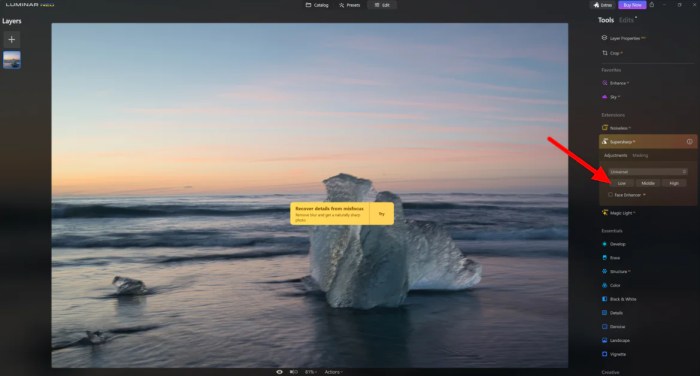
The Luminar Neo interface is designed with user experience in mind, featuring a clean layout that facilitates easy navigation. The workspace is customizable, allowing users to arrange tools and panels according to their workflow preferences.
Key usability features include:
- Intuitive Tool Panels: Tools are organized logically, enabling quick access and minimizing the time spent searching for specific functions.
- Preview Options: Users can view edits in real-time, providing immediate feedback on changes made.
- Keyboard Shortcuts: Customizable shortcuts enhance editing speed and efficiency for experienced users.
To illustrate the differences in user interface, here is a comparison table between Luminar Neo and other popular photo editors:
| Feature | Luminar Neo | Adobe Lightroom | Capture One |
|---|---|---|---|
| Customization | High | Moderate | High |
| AI Tools | Extensive | Limited | Moderate |
| Real-Time Preview | Yes | Yes | No |
Editing Tools and Functions
Luminar Neo offers a comprehensive range of essential editing tools that cater to various editing needs. These tools include cropping, exposure adjustments, color grading, and more, all enhanced by AI capabilities.
Unique features worth noting are:
- AI Sky Replacement: Easily replaces the sky in any image, adjusting the overall tone to create a harmonious look.
- Portrait Enhancer: Allows for quick and effective adjustments to portrait images, enhancing facial features with a few clicks.
For users looking to maximize their experience, here are step-by-step procedures for using advanced editing functions effectively:
- Import your image into Luminar Neo.
- Select the AI Sky Replacement tool from the toolbar.
- Choose a new sky from the library or upload a custom sky.
- Adjust the brightness and color settings to blend the new sky seamlessly.
- Apply the Portrait Enhancer tool to refine facial features.
- Export your final image in the desired format.
Performance and System Requirements
To ensure optimal performance, Luminar Neo has specific system requirements. The minimum specifications include a recent operating system, adequate RAM, and a capable graphics card. Recommended specifications enhance the software’s capabilities, allowing for faster processing and smoother performance.
Minimum system requirements:
- Operating System: Windows 10 or later / macOS 10.14 or later
- RAM: 8 GB
- Graphics Card: DirectX 12 compatible / Metal compatible
Recommended system specifications:
- Operating System: Windows 11 / macOS 11 or later
- RAM: 16 GB or more
- Graphics Card: Dedicated GPU with 4 GB VRAM
Performance benchmarks indicate that users experience fast processing times, even with high-resolution images. To optimize system performance while using Luminar Neo, consider the following tips:
- Close unnecessary applications running in the background.
- Keep your graphics drivers updated.
- Regularly clear cache and temporary files.
Integration with Other Software
Luminar Neo is compatible with various third-party applications and plugins, enhancing its versatility as a photo editing tool.
Integrating Luminar Neo with other software provides additional functionalities, allowing users to create more complex edits or workflows. Popular applications that integrate well with Luminar Neo include:
- Adobe Photoshop
- Adobe Lightroom
- Affinity Photo
The benefits of using Luminar Neo alongside these tools include streamlined workflows, the ability to perform more intricate edits, and enhanced creative options.
Support and Learning Resources
Skylum offers a variety of resources to help users learn how to use Luminar Neo effectively. These resources include:
- Official tutorials on the Skylum website.
- User forums for community support and sharing tips.
- Webinars and live sessions hosted by expert photographers.
The supportive community surrounding Luminar Neo, along with comprehensive learning materials, empowers users to improve their editing skills and maximize the software’s potential.
Pricing and Licensing Options
Luminar Neo offers multiple pricing tiers and licensing options, catering to different user needs. The software is available for purchase as a one-time license or through subscription models, allowing flexibility for users.
The value proposition of Luminar Neo is significant, considering its advanced features and AI capabilities. Here is a comparison table showcasing pricing structures of similar photo editing tools:
| Photo Editing Tool | Pricing Model | Price |
|---|---|---|
| Luminar Neo | One-time / Subscription | $79 / $69 per year |
| Adobe Lightroom | Subscription | $9.99 per month |
| Capture One | One-time / Subscription | $299 / $24 per month |
User Feedback and Reviews
User feedback on Luminar Neo highlights a range of praises and criticisms. Common praises include its powerful AI tools and user-friendly interface, while criticisms often focus on occasional performance issues.
The impact of user feedback on software updates is evident, as Skylum actively incorporates suggestions and addresses concerns in new releases. Key points from aggregated user testimonials include:
- Pros:
- Fast and efficient image processing.
- Intuitive and customizable interface.
- Powerful AI features for quick edits.
- Cons:
- Some users report bugs in certain features.
- Learning curve for advanced functionality.
Future Developments and Updates, Luminar Neo – AI Photo Editor – Skylum
Skylum has a roadmap for Luminar Neo that includes anticipated features and improvements in future versions. Users can expect enhancements to existing tools, as well as the introduction of new AI capabilities that further streamline the editing process.
User expectations regarding future updates focus on improving performance and adding more versatile editing options. Insights indicate a desire for continued innovation that maintains Luminar Neo’s competitive edge in the photo editing market.